
Smiley Feedback Buttons™ for Real-Time Feedback
Capture feedback in the moment. Act on it while it still matters.
One-tap, anonymous feedback makes it easy for customers, patients, and travelers to share their experience on the spot—giving your teams real-time insight into what’s working and where attention is needed.
Choose the Perfect Feedback Solution for Your Needs

Physical
Durable, one-touch buttons designed for high-traffic environments that capture instant sentiment with 40% more response rates—built to withstand decades of interaction while requiring minimal maintenance.
Recommended For: Retail checkouts, Hotel lobbies, Employee break rooms
Touchless
Hygienic wave-activated buttons ideal for healthcare and public spaces, combining hospital-grade antimicrobial materials with real-time alerts to notify staff when satisfaction scores dip below thresholds.
Recommended For: Hospitals, Pharmacies, Food service, Public transit

Digital
Fully customizable on-screen feedback solutions that integrate seamlessly with your existing digital platforms—from kiosks to employee tablets—delivering branded sentiment tracking with CRM sync capabilities.
Recommended For: Mobile apps, Airport kiosks, POS systems
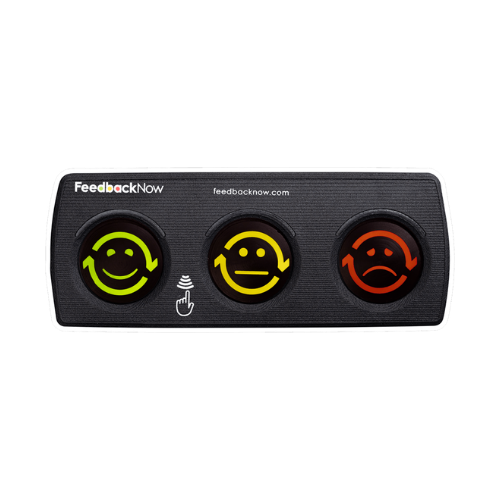
What are Smiley Feedback Buttons?
Why high-traffic locations use one tap
In busy environments, people are unlikely to stop for a survey, scan a QR code, or download an app. Smiley Feedback Buttons capture feedback with a single tap, right at the point of experience.
- Placement matters. Buttons at restroom exits, security checkpoints, gates, and checkout areas make it easy to respond while the experience is still fresh.
- FeedbackNow customers have seen response rates up to 20x higher than traditional surveys
- Wngagement typically ranging from 5% to 20%, depending on placement and use case.

Digital Variety at Your Fingertips
Tablets
Professional touchscreen stations for high-traffic areas with customizable interfaces.
- Durable & visible: Eye-catching kiosks designed for 24/7 use in lobbies, exits,
or service counters. - Completely customizable: Personalize tablet content like logo, brand colors,
and even content and placement alongside smiley ratings.

Embed
Cover all bases by integrating smiley feedback directly into your website, app, and even email signature.
- Frictionless collection: Customers rate without leaving your digital platforms.
- Context-aware: Trigger feedback prompts after key actions (purchases, support chats).

Smart Links
URL-based feedback that works anywhere—emails, receipts, or digital signage.
- No hardware needed: Works on any customer device via simple click.
- Timely interactions: Send customers to specific feedback flows directly after a customer engagement.

QR Code
Offer a touchless alternative to smiley buttons—capture rich feedback anywhere with scannable convenience.
- Touchless hygiene: Perfect complement to Smiley Boxes for healthcare, restaurants, and high-traffic areas.
- Seamless deployment: Automatically print on receipts or display digitally—no hardware required.
- Space-efficient: Deploy on posters, product packaging, or any point-of-sale without of the bulky equipment

Deeper Insight
Unlock the 'why' behind scores with smart follow-ups: custom reason codes, icons, and open-text comments.
Enterprise-Grade Flexibility
Fully customizable to your brand and goals: multi-question flows, live results, and diverse integration options.
Three-Button Simplicity
Get instant, secure feedback with our patented smiley interface—just 3 taps for actionable insights, completely anonymous.
Seamless Omnichannel Feedback
Capture sentiment across physical and digital touchpoints—bridge the experience gap consistently across all channels in real time.
Where to use Smiley Buttons
The FeedbackNow
Method

Used by Industry Leaders Since 2012
Top enterprises rely on FeedbackNow as the first—and most secure—data capture solution, streamlining solutions from collection to insights.

Attractions
From transit hubs to libraries, our durable buttons withstand heavy use while capturing data to guide service upgrades.

Hospitals
HIPAA-compliant touchless buttons in waiting rooms and discharge areas provide actionable patient insights.

Frequently Asked Questions
Buttons - Setup
How Long do the Batteries Last and What Upkeep is Needed?
The batteries have an estimated lifespan of 3 years or 1 million presses (whichever comes first). They are user-replaceable, and the system provides proactive alerts when power is low. If needed, our support team can assist with replacement—either remotely or in person.
Can I Customize the Feedback Question or Icons?
Yes—both the feedback prompt and icons are fully customizable to suit your specific needs.
Do I Need Wi-Fi to Use the Devices?
No. The system operates on an independent, self-contained network, eliminating the need for IT integration or external internet connectivity.
Buttons - Interactions
What is the Average Engagement Rate for Feedback Buttons?
Engagement typically ranges between 5-20%, with variations based on placements and use cases. Our analytics dashboard helps you track and optimize placement for maximum response rates.
What’s the Difference Between the Original and Touchless?
The Touchless model offers dual input methods, allowing users to either press the button or simply hover their hand near the sensor for contactless interaction.
FeedbackNow Platform
How Do You Store PII Information?
FeedbackNow does not collect or store any personally identifiable information (PII) that can be tied back to an individual. Our systems are designed to capture anonymous data. All data is aggregated and stored securely in accordance with industry best practices, ensuring insights are available without ever exposing individual identities.
What Happens If There Is An Attempted Breach?
We have safeguards and response protocols in place to quickly detect, contain, and remediate any attempted or suspected breach, minimizing risk to our customers’ data.
Do You Work With Third-Party Vendors? If So, How Is My Data Handled?
We occasionally work with trusted third-party vendors. When we do, they are contractually bound to keep all information confidential and secure, following strict security requirements consistent with our own standards.
Are My Data Transfers Secure?
Yes. All data transfers are encrypted and protected against interception. Whether data is moving within our systems or externally, we ensure it travels securely.
How Do You Monitor For Suspicious Activity?
We collect IP addresses and maintain detailed system logs to enforce security policies and detect any anomalous activity. These logs are continuously reviewed for potential threats or unusual access patterns.
Who Has Access To My Data?
Access to restricted portions of our systems is limited strictly to authorized personnel. We apply the principle of least privilege, ensuring only those who need access for their role can view or handle sensitive data.
How Does FeedbackNow Protect My Data?
FeedbackNow maintains a robust security posture to safeguard your data at every step. We use technical, administrative, and physical security measures designed to prevent unauthorized access, disclosure, alteration, or destruction of your information.
What Happens if One Person Repeatedly Presses the Button?
To prevent spam or accidental multiple submissions, our system includes a configurable lockout feature that restricts repeated inputs. Additionally, an AI-powered algorithm detects and filters anomalous voting patterns—for instance votes by maintenance staff—to maintain data integrity.
How do the Smiley Buttons Collect and Transmit Data?
Customers are presented with a three-option feedback panel (ranging from positive to negative). When a button is pressed, it lights up to confirm the person’s response which is then sent to a central device called a "gateway". All responses are aggregated and processed in this special computer. The buttons themselves monitor battery levels and send low-power alerts, ensuring seamless operation while providing an intuitive way for users to share feedback.
Let Our Experts Design Your Perfect Feedback Solution